

Docs / Apps / Isolink Connect
Isolink Connect
Isolink Connect lets other apps keep their data in Isolink. It's end-to-end encrypted and synced between people and devices over Bluetooth, Wi-Fi and relays, with no server of the app's own, and the app's company never sees it. Apps get capabilities, not data: an app sees only its own spaces, and people only as handles that are different in every app.
What it is
EveryoneSome apps are about sharing with people near you: a house splitting bills, a family sharing a fridge, friends planning a trip. Usually that means the app's company runs a server that holds everyone's data. With Isolink Connect, the app keeps its data in Isolink instead, and Isolink carries it between you and the people you share with, the same way it carries your messages.
- It's sealed end to end. Relays, and the app's company, can't read it.
- It works with no signal: phones in the same house sync over Bluetooth and Wi-Fi, and contacts can carry changes for you.
- The app sees only what it keeps in Isolink. It can't see your chats, your contacts or your Isolink code.
- Apps that have their own server can keep it, and use Isolink for the times you're offline.
- The app knows the people you share with only by a handle that is different in every app, so two apps can't match you up.
Allowing an app
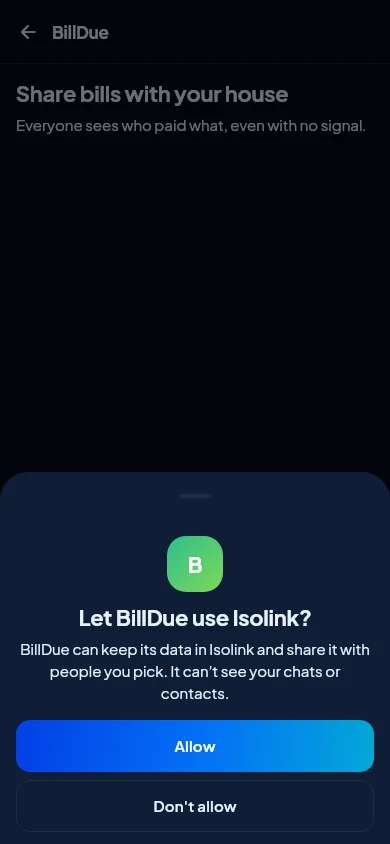
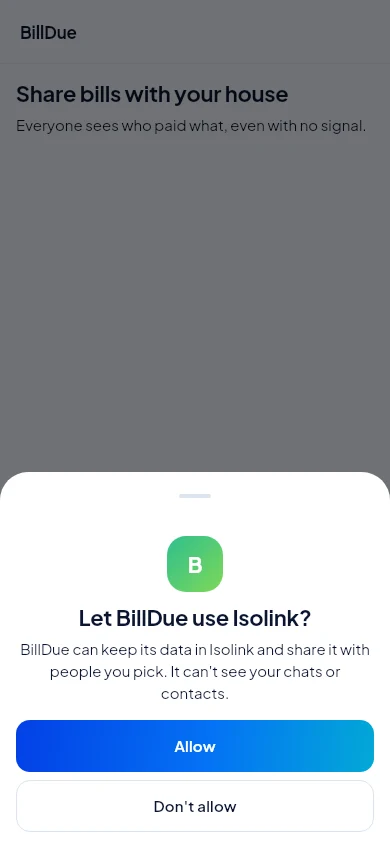
The first time an app asks to use Isolink, Isolink asks you. On Android, the sheet opens over the app, and the app's name and icon come from Android itself, so an app can't pretend to be another. Tap Allow or Don't allow. You're only asked once.
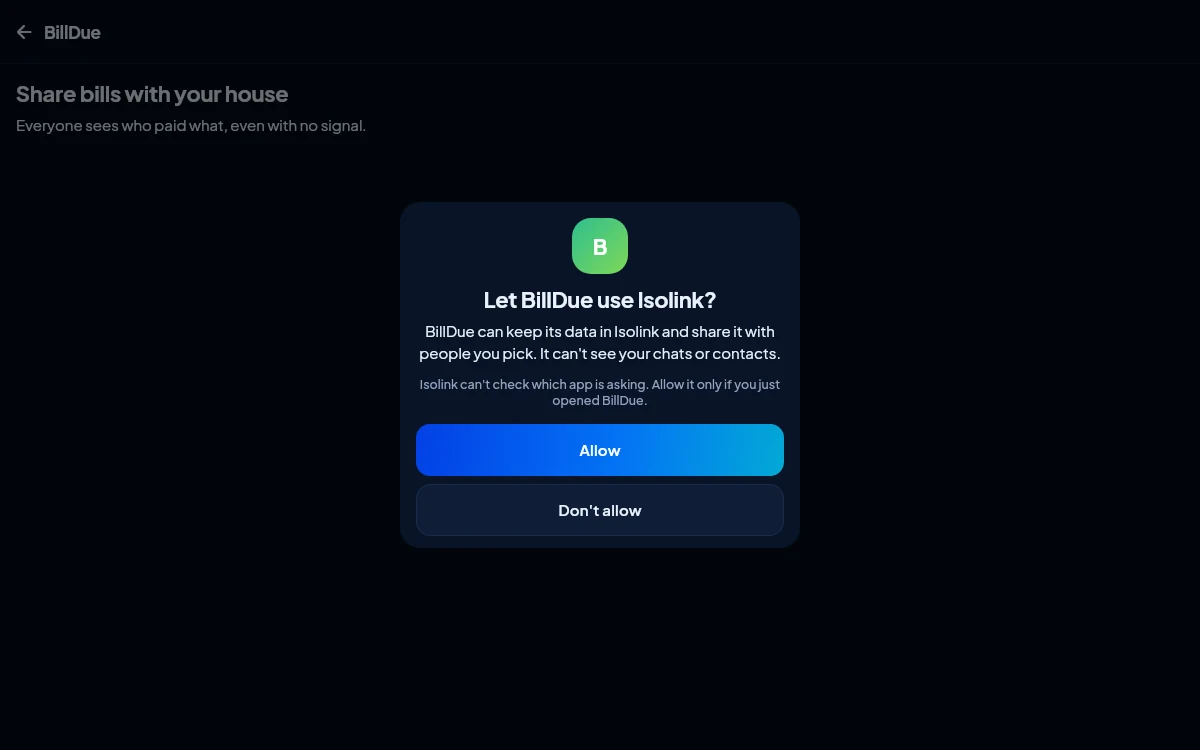
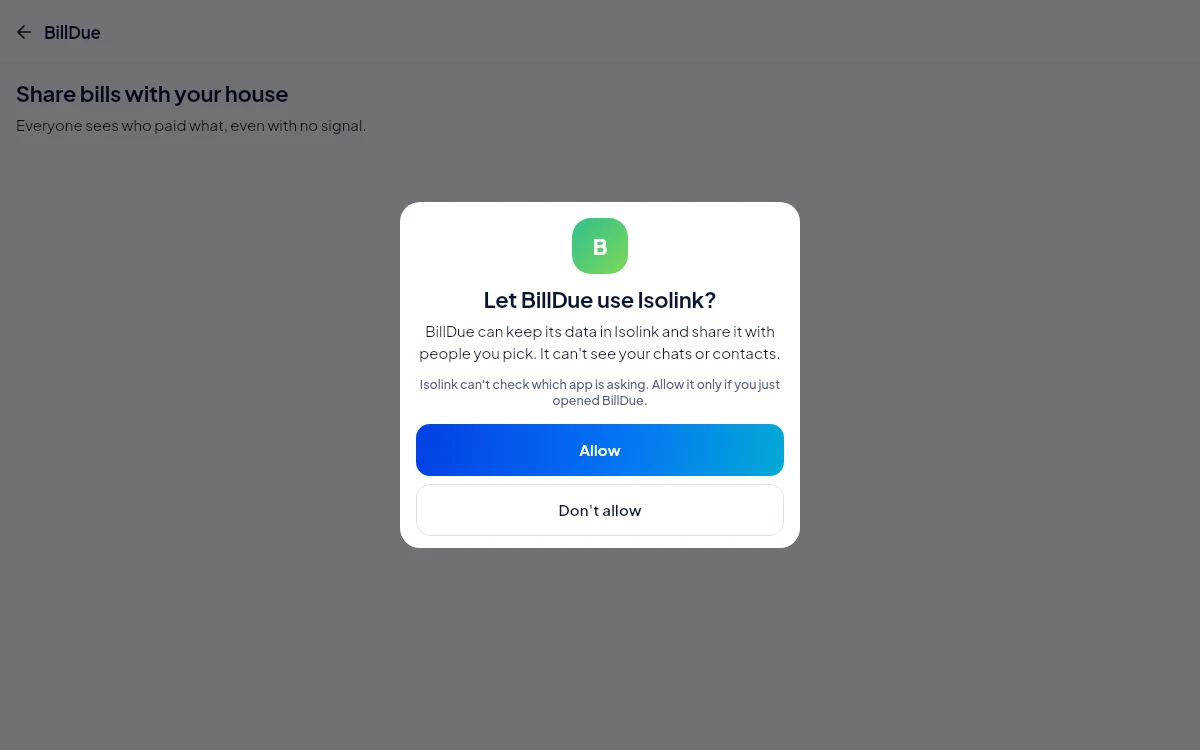
On a computer, Isolink shows the question in its own window. A computer can't tell Isolink which program is asking, so the sheet says so. Only allow it if you just opened that app.
Sharing with people
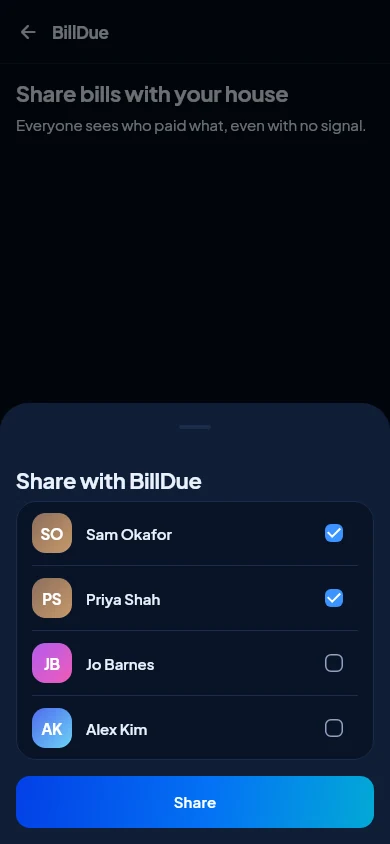
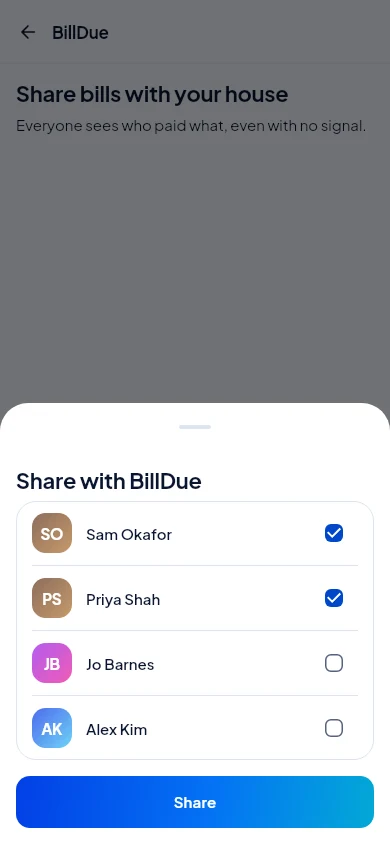
An app never sees your contacts. When it wants to share with someone, Isolink opens its own picker, and you choose who. The app can then add only the people you picked, and people already sharing with it.
Connected apps
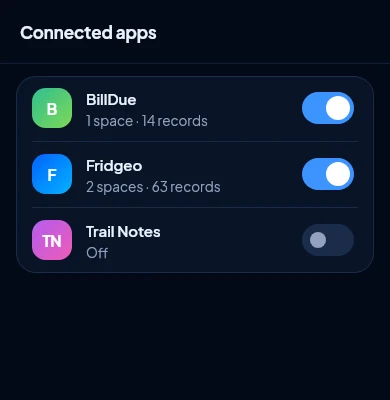
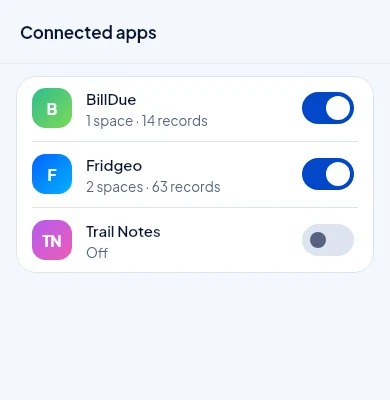
Go to Settings › Privacy › Connected apps to see every app that uses Isolink, with how many spaces and records each one keeps.
- The switch turns an app off. It can't connect until you turn it on again, and its data stays.
- Tap an app, then Remove, to leave its spaces and delete its data from this device. On Android it has to ask you again before it can use Isolink.
Host and embedded mode
DevelopersAn app uses Isolink in one of two ways, with the same API in both:
- Host mode: the person has Isolink installed, and the app talks to it. The person allows the app once, picks who to share with in Isolink, and can turn the app off or remove it in Connected apps.
- Embedded mode: the app runs Isolink's engine inside itself, as an Isolink account of its own. It needs no Isolink installed, and every SDK update brings the engine's improvements.
Either way, an app can also keep its own server. Isolink then works as the app's offline layer: it carries changes between people when there's no signal, and the server keeps a copy for when there is. See With your own server.
The API is a small protocol of JSON frames, so any language can speak it. There are SDKs for Dart (Flutter included) and TypeScript.
| Package | What it is |
|---|---|
isolink_connect | Dart SDK: the embedded engine (InProcessPort), Isolink on a computer (SocketPort), and isolink codegen |
isolink_connect_flutter | Flutter plugin: the installed Isolink app on Android (AndroidHostPort), and connectIsolink, which picks the best way in |
@isolink/connect | TypeScript SDK, with Node and Electron (@isolink/connect/node) and a React hook (@isolink/connect/react) |
isolink_core | The engine: spaces, records, the protocol, and ConnectServer, which answers apps |
Quick start
1. Describe your data
Write an .isoschema.yaml with your app and the record types it keeps. connect.schema.json describes the format.
app:
  id: com.billdue.app        # on Android, your package name
  name: BillDue
types:
  bill:
    title: string
    amount: int
    due: datetime
    paidBy: set<string>      # handles of the people who paid
    reminders: counter
  payment:
    bill: string
    amount: int
    by: string
Field types: string, int, double, bool, datetime, json, list<…> of those, set<…> and counter. How each merges is under Records.
2. Generate models
dart run isolink_connect:isolink codegen billdue.isoschema.yaml --dart lib/billdue.g.dart --ts src/billdue.g.tsThis writes model classes for Dart and TypeScript, and billdue.isoschema.lock beside the schema.
Commit the lock file. It holds every field id, so a field keeps its id forever, and the id of a field you remove is never given to a new one. You can give an id by hand: note: {type: string, id: 9}. Changing a field's type is refused, because data already written wouldn't read; give the field a new name instead. In CI, --check fails if anything is out of date.
3. Connect and use it
Dart and Flutter:
import 'package:isolink_connect_flutter/isolink_connect_flutter.dart';
import 'billdue.g.dart';

// The installed Isolink on Android or a computer, or else an engine inside the app.
final isolink = await connectIsolink(
  billDueApp,
  embedded: () => InProcessPort.open(myStore, app: billDueApp.id, name: 'My phone'),
  token: savedToken,          // on a computer: isolink.token from last time
);

final house = await isolink.spaces.open('house:14-elm', name: '14 Elm St');
final people = await isolink.people.pick();            // the person picks, in Isolink
await isolink.spaces.add(house.id, [for (final p in people) p.handle]);

await Bill.edit(isolink, house.id, 'rent', [Bill.setTitle('Rent'), Bill.setAmount(180000)]);
Bill.watch(isolink, house.id).listen((bills) => print(bills.map((b) => b.title)));
TypeScript, in Node or Electron, reaching Isolink on the computer:
import { IsolinkConnect } from '@isolink/connect';
import { socketPort } from '@isolink/connect/node';
import { Bill, billDueApp } from './billdue.g.js';

const port = await socketPort();
if (!port) throw new Error('Open Isolink first');
const isolink = await IsolinkConnect.connect(port, billDueApp, { token: savedToken });
saveToken(isolink.token);

const house = await isolink.spaces.open('house:14-elm', { name: '14 Elm St' });
await Bill.edit(isolink, house.id, 'rent', [Bill.setTitle('Rent'), Bill.setAmount(180000)]);
const stop = Bill.watch(isolink, house.id, (bills) => render(bills));
React:
import { useRecords } from '@isolink/connect/react';

const bills = useRecords(isolink, house.id, Bill.type, Bill.fromRecord);
Spaces
A space is the people an app shares a set of records with: a house sharing bills, a kitchen sharing meals. Inside Isolink it's a variation of a group chat, with the same members, admins and sealed delivery, so it's relayed, carried by contacts and kept in step across the person's devices. It belongs to one app and never shows in the chat list.
spaces.open(key, name:)- Returns the space your app calls
key, and makes it if there isn't one. Use it for things that exist once, like a house. spaces.create(name, key:, people:)- Makes a new space with people (handles).
spaces.add(space, people)- Adds people to a space.
spaces.leave(space)- Leaves it.
spaces.list(),spaces.get(space)- The app's spaces, or one of them.
spaces.merge(keep:, fold:)- Folds one space into another.
When two people make "the same" space while apart, spaces.duplicates (Dart) or spaces.onDuplicate (TypeScript) says so when they meet. Ask the person, then call spaces.merge. Isolink never merges by itself, because only your app knows whether two spaces are really the same thing.
spaces.changes (onChange) fires when a space is made, joined or changed, and spaces.removed (onRemove) when it's left or the person is taken out.
Records
A record is an id, a type and fields named by number. The generated models handle the numbers for you. Edits arrive in any order and more than once, and every device ends up the same.
| Field | Edit | Merge |
|---|---|---|
| Value | setValue(field, value) | The latest write wins. Clocks are hybrid logical clocks, and the device id breaks ties. |
| Counter | addToCounter(field, by) | Every device's additions add up, so two people adding at once both count. Counters only go up; keep a second counter for what's taken away. |
| Set | addToSet / removeFromSet | An item is in the set while its latest add is later than its latest remove. |
records.edit(space, type, id, edits)- Edits a record, and makes it if it's new.
records.delete(space, id)- Leaves a tombstone. A later edit brings the record back.
records.list(space, type:),records.get(space, id)- Reads records.
records.changes,records.watch- Every change, from this device or anyone else's.
Fields an older version of your app doesn't know are kept and passed on. A record holds at most 64 KB, and a space at most 50,000 records on each device.
People
An app sees a person as a handle, h_ and 32 hex characters: the same everywhere in that app, and different in every other app. Each person has a name, and me is true for the person using the app.
- Host mode:
people.pick(many:)opens Isolink's picker. Your app can add to its spaces only people the person picked, and people already in its spaces. It can't read the person's contacts or Isolink code. - Embedded mode: your app's engine is its own Isolink account.
people.code()is its code (show it as a QR code),people.add(code)adds someone from theirs, andpeople.list()lists everyone it knows.
On a computer, the first connection gives your app a secret, token. Keep it and pass it next time, or the person is asked again.
With your own server
An app that already has a server and an API can keep both, and use Isolink to move its data when the internet doesn't. The server keeps a copy of each space's records, and Isolink keeps one on every phone in the space. Changes go to the server whenever the phone can reach it, and between people over Bluetooth, Wi-Fi and Isolink's relays when it can't. Every copy ends up the same, because record states merge the same whatever order they arrive in, however often.
The SDKs do this with ServerSync. For each space, your server keeps the latest state of each record by id, merged with mergeRecordStates, and says what changed since a cursor:
class MyServer implements SyncServer {
  @override
  Future<void> upload(Space space, List<Map<String, Object?>> states) =>
      api.post('/spaces/${space.id}/states', states); // the server merges each with mergeRecordStates

  @override
  Future<({List<Map<String, Object?>> states, String? cursor})> download(Space space, String? cursor) async {
    final r = await api.get('/spaces/${space.id}/states', since: cursor);
    return (states: r.states, cursor: r.cursor);
  }
}

final sync = ServerSync(isolink, MyServer(), cursors: saved)..start();
// Later: save sync.cursors, so a restart sends only what changed.
import { ServerSync, mergeRecordStates, recordFromState } from '@isolink/connect/sync';
const sync = new ServerSync(isolink, myServer, { cursors: saved, onError: showOffline });
sync.start();
// On the server (Node): keep the merged state, and read it as a record.
const next = before ? mergeRecordStates(before, incoming) : incoming;
const record = recordFromState(next); // { id, type, fields } or null when deletedServerSyncsyncs every space of the app at start, half a second after a change, and every minute. When the server can't be reached, the change stays in Isolink, still goes to people nearby, and is sent on the next sync. Failures go toerrors(Dart) oronError(TypeScript).- A state is JSON:
{id, t: type, f: {fieldId: field}, del?}, where a field is a value{v, c: clock}, a counter{n: {device: total}}or a set{e: {item: {a?: added, r?: removed}}}, and clocks aremillis-counter-devicetext. Store it as it is.recordFromStatereads it when your server needs the values, with the same field ids as your generated models. - A space has the same id on every phone in it, so use it, or your app's own
key, as the server's id for the space. - Merging is safe to repeat, so a lost cursor only means sending everything once more.
- To have the server's copy on a phone with no Isolink installed, use embedded mode with
ServerSync. The same code works online through the server and offline through the engine inside the app. - Under the hood are
sync.pullandsync.push; see The protocol.
Errors
Every refusal has a code:
| Code | Meaning |
|---|---|
bad_request | The request is malformed, or an edit is invalid, like a counter going down or a field of another kind |
not_connected | Say hello first, or the connection ended |
consent_required | Nobody has allowed this app yet. On Android the SDK asks and tries again |
denied | The person said no, the app was removed, or it isn't the app the system says |
turned_off | The person turned this app off |
unknown_space | No such space, or not this app's |
unknown_person | A handle this app can't add: pick them first |
too_big | The record would pass 64 KB, or the space is full |
not_allowed | Not in this mode, like reading the person's code on an installed Isolink |
unsupported | A method this engine doesn't have |
failed | Something else. On Android, Isolink handed over between its engines: try again |
The protocol
Every frame is one JSON object in UTF-8, at most 256 KB. connect.schema.json describes them all.
{"id": 7, "m": "records.edit", "p": {"space": "...", "type": "bill", "id": "rent", "edits": [...]}}
{"id": 7, "r": {...}}
{"id": 7, "e": {"code": "unknown_space", "message": "..."}}
{"ev": "records.changed", "p": {...}}
A request, its answer or its refusal, and an event. The first request is hello: {"protocol": 1, "app": {"id", "name", "publisher"?, "types"?}, "token"?}. It answers {"protocol", "mode": "host" | "embedded", "me": Person, "token"?}.
| Method | Params | Answer |
|---|---|---|
status | {running, reachable} | |
spaces.list | [Space] | |
spaces.get | space | Space |
spaces.open | key, name | Space |
spaces.create | name, key?, people? | Space |
spaces.add | space, people | Space |
spaces.leave | space | null |
spaces.merge | keep, fold | Space |
records.list | space, type? | [Record] |
records.get | space, id | Record or null |
records.edit | space, type, id, edits | Record |
records.delete | space, id | null |
sync.pull | space, cursor? | {states, cursor, more}: every record state that changed since cursor (all when it's missing or from before a restart), about 192 KB a page |
sync.push | space, states | {changed}: joins states from the app's server into the space and sends what's new to everyone in it |
people.pick | many? | [Person]. Host mode; on Android the SDK opens the picker itself |
people.code | string. Embedded mode | |
people.add | code | Person. Embedded mode |
people.list | [Person]. Embedded mode |
Space{id, key, name, admin, people: [Person]}Person{handle, name, me, admin?}Record{id, type, fields: {"1": value, ...}}. A counter's value is its total; a set's is a list.Edit{"op": "setValue", "field": 1, "value": ...},{"op": "addToCounter", "field": 2, "by": 3}, or{"op": "addToSet" | "removeFromSet", "field": 4, "items": [...]}
Events:
records.changed{space, id, type, deleted, record, by}spaces.changed- A
Space spaces.removed{space}spaces.duplicate{older, newer}closed{reason}, when Isolink ends the connection
Transports
- Embedded: frames go straight to the engine in the same process (
InProcessPort). - Android: bind the service with action
dev.isolink.action.CONNECT_SERVICEin packagedev.isolink.isolink, and sendandroid.os.Messages:what = 1with the frame indata.getString("frame")andreplyToset,what = 2to hang up. Answers come back the same way. For consent, startdev.isolink.action.CONNECTfor a result; for the picker,dev.isolink.action.CONNECT_PICK(extramany), whose result has the picked people as JSON inpeople.isolink_connect_flutterdoes all of this. - Windows, macOS and Linux: TCP on
127.0.0.1:47231, one frame per line. Only programs on the same computer reach it, and web pages can't open raw sockets.
On Android, declare Isolink in your manifest so your app can see it:
<queries><package android:name="dev.isolink.isolink" /></queries>To write an SDK for another language, speak these frames and run the conformance vectors in packages/isolink_core/test/connect/*.json. They're data, not code, so every SDK runs the same ones.
Not built yet
- The engine for browsers (WebAssembly), so a web page can use Isolink embedded.
- Kotlin, Swift and React Native SDKs, and iOS. iOS will be embedded only, since apps there can't reach each other's services.
- Files in spaces. Keep files out of records for now: a record holds at most 64 KB.