

Docs / Interactive cards
Interactive cards
A card is a small form you send in a chat: a poll, a sign-up sheet, a checklist or a quick survey. Everyone in the chat can answer it, and everyone sees the answers come in.

What a card is
EveryoneA card has a title, an emoji, an accent colour and a list of blocks: some text, a question with options, a checklist, a star rating, a few buttons. You build it once, keep it in My cards, and send it into any chat.
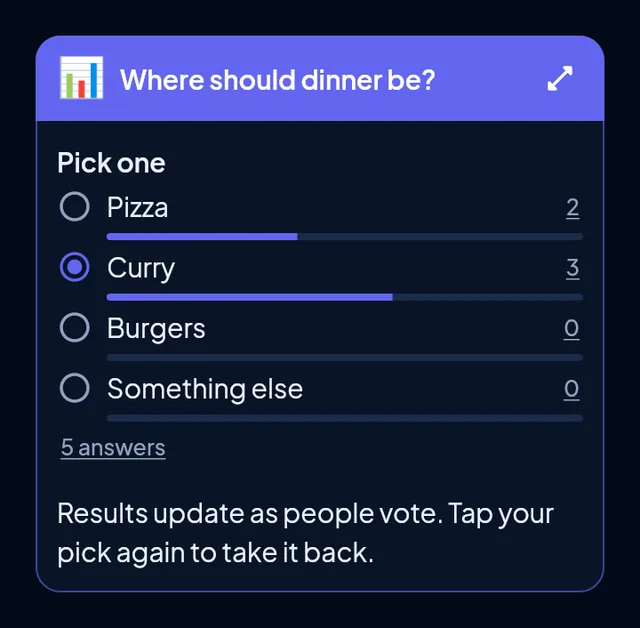
In the chat, everyone can answer. Votes, ticks and stars appear on every phone as they happen, with counts under each question. Tap a count to see who answered. The person who sent the card can close it to new answers when the time is up.
Cards are made of blocks, so there is no code to write. If you want a card that does more, such as a game, a timer or a card that keeps score, read Scripted cards.
Cards work in one-to-one chats and in groups, over Wi-Fi, Bluetooth or through a community, just like messages. Answers are sent end-to-end encrypted, the same way messages are.
Blocks
EveryoneA card holds up to 30 blocks, shown in order. These are the kinds of block you can use:
| Block | What it shows | How people answer |
|---|---|---|
| Text | Words, with simple formatting: **bold**, _italic_, lists and links. | They don't. It's for information. |
| Picture | A photo, with an optional caption. Or someone's profile picture, cover photo, or a picture already sent in the chat. | They don't. |
| Button | A button that does one of three things: counts who tapped it, opens a web link, or starts a reply to the card. | A tap. Tapping again takes it back. |
| Choice | A question with 2 to 12 options. Pick one, or allow several. | A pick, with live counts and bars. |
| Checklist | 1 to 30 items with tick boxes. | Anyone can tick or untick any item. Ticks are shared by everyone. |
| Answer | A question answered in words, with a hint in the empty box. | Up to 500 characters each. |
| Rating | A question answered with 1 to 5 stars. | Stars, with the average shown. |
| Link | A web link with a title. | They don't. It opens the page. |
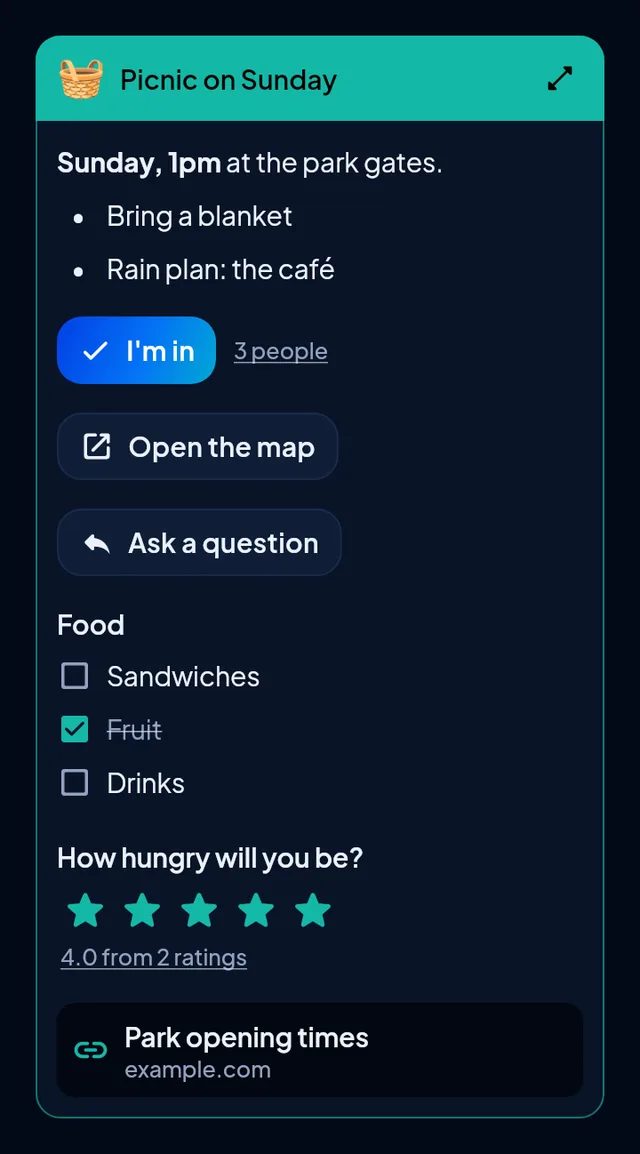
{
  "v": 1,
  "id": "picnic",
  "title": "Picnic on Sunday",
  "emoji": "🧺",
  "accent": 4279548070,
  "blocks": [
    { "id": "when", "k": "text", "t": "**Sunday, 1pm** at the park gates.\n- Bring a blanket\n- Rain plan: the café" },
    { "id": "in", "k": "button", "t": "I'm in", "a": "respond" },
    { "id": "map", "k": "button", "t": "Open the map", "a": "link", "u": "https://example.com/map" },
    { "id": "ask", "k": "button", "t": "Ask a question", "a": "reply" },
    { "id": "food", "k": "checklist", "t": "Food", "o": ["Sandwiches", "Fruit", "Drinks"] },
    { "id": "hungry", "k": "rating", "t": "How hungry will you be?" },
    { "id": "site", "k": "link", "t": "Park opening times", "u": "https://example.com/park" }
  ]
}
Make a card
EveryoneCards are made in Card Studio.
- Go to You → My cards and tap + (New card). You can also start from a chat: tap + beside the message box, choose Card, then New card.
- Pick a template, or Blank card. The templates are grouped into Plans, Polls, Lists, Games and Tools, and you can search them. Examples include RSVP, Meet up, Lift share, Poll, Quick survey, Rate it, Checklist, Sign-up sheet, Kit list, House chores and Check in.
- In the Design tab, drag blocks from the palette into the card, or tap one to add it at the end. Drag a block's handle to move it, and tap a block to set it up: its question, options, items, hint or link.
- Open Card details to set the card's name, emoji and colour.
- Use the Preview tab to try the card. Nothing you do there is sent.
- Tap Save. The card goes to My cards. If you belong to a community, you can save it to the community's card library instead (see Community card library).
To change a card later, open it in My cards and tap Edit. Cards you already sent stay as they were when you sent them.
Want more than blocks? In Card Studio, Switch to code turns the blocks into a script you can change in any way. The card stays code after that. You can also start from Blank scripted card. See Scripted cards.
Send a card
Everyone- In a chat, tap + beside the message box and choose Card.
- Pick a card from My cards.
- Check it in the last look, then tap Send.
The last look has a few options:
- Send as a preview. The card is for a look only. People can still try it, but a bot won't answer taps on it.
- Add the group's info (groups only). The card gets who is in the group, their status lines and who is online, so it can show them. Without it, a group card carries nothing extra.
- Bot slots (scripted cards that have them). Choose which of the chat's community bots sits in each slot. See Bot slots.
You can also send a card from My cards: open it and tap Send in a chat.
Answers and how they sync
Everyone- One answer per person per question. A new answer replaces your old one. Tap your pick again, or clear your words, to take it back.
- Checklists are shared. Anyone can tick or untick any item. If two people change the same item, the newest change wins on every phone.
- Everyone sees the same counts. Each answer goes to everyone in the chat and to your own other devices. Each one carries a time, so every phone settles on the same result even if answers arrive out of order.
- Forms. A card can ask everything first and send it with one button, like Send answers, instead of each question on its own. A private form sends your answers only to whoever sent the card: the card says Only Kyle sees your answers. While you fill it in, the sender sees Being filled in by you, then your answers when you send. Change answers lets you send them again until the card is closed.
- Parts for some people. A block can show only to the sender, only to everyone else, or only to some people, so the sender sees a summary and everyone else sees the questions.
- See who answered. Tap a count under a question or option.
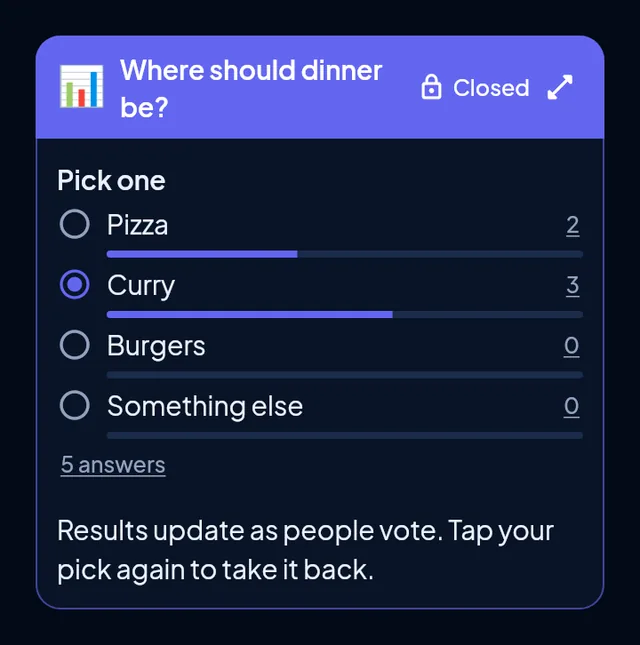
- Close to answers. Only the person who sent a card can close it. Long-press the card and choose Close to answers. The card shows Closed and takes no new answers. Open to answers opens it again.
- Long cards. In a chat, a card shows about 480 points of its height. Anything below is behind Show all. The button in the card's header opens it full screen.
- Older apps. Someone on an older version of Isolink sees a line with the card's title asking them to update.
Long-press a card in a chat for more: Save to My cards, Copy card code and, for scripted cards, Sites this card can reach.
My cards
EveryoneYou → My cards holds the cards you made or saved, up to 200. It follows your account: a card you save on your phone appears on your other linked devices, and a card you delete goes from all of them. Cards already sent stay in their chats.
Tap a card to try it, then:
- Send in a chat
- Edit, in Card Studio
- Copy card code, to paste anywhere
- Export as a file, a
.isocardfile - Publish to my community, if you belong to a community
- Install on a community bot, for cards with community actions, if you run a community
- Delete
The download button at the top, Import a card, takes a card from a code on the clipboard or from a .isocard file.
Share a card as a code or a file
EveryoneA card can travel outside a chat in two ways:
- A card code: text starting
isolink-card:. Paste it into an email, a document or a message in another app. Isolink finds the card in it. - A
.isocardfile: the same code in a file. Share it to other apps on a phone, or save it on a computer.
When you open a code or a file, Isolink shows the card first, then asks Add this card? with what it can do: the pictures inside it, the sites it reaches (each with its own switch), the community actions it calls, and whether it runs a script. A card that is only blocks says Just blocks: it reaches no sites and runs no script. Only add a card if you trust who made it.
A card code or file sent in a chat can be opened from the message's menu with Open card.
Cards in a community's card library
EveryoneIf you belong to a community, it has a card library that its members share. Open the community and tap Card library to browse it, try a card, save it to My cards or send it.
- Publish a card from My cards with Publish to my community, or choose the community when you save in Card Studio.
- Who sees it. Choose everyone on it and every member sees the card in the library. Choose only you and it is in the library for you alone. You can switch a card you published between the two at any time with the lock and globe button. Guests of the community can't use the library.
- Cards that keep up to date. A card sent from the library remembers where it came from. When you publish a newer version under the same card, copies in chats change to it in place, and their answers stay. This happens for people who are members of that community, and is checked at most once a minute while the card is on screen. It works for cards kept for you alone too: copies you send still update.
- Communities choose. A community's owner can turn the library, or publishing to it, off for some or all of its members with the community's policy. Isolink's own community at
relay.isolink.appdoesn't take published cards. - Removing. Only the person who published a card, or a community admin with the
cardsright, can remove it.
Cards in the library are not encrypted for the community. Whoever runs the community can read them. Key values are never put in the library: Isolink takes them out before publishing.
Templates from your community
A community can offer its own card templates. When you make a new card, they show first, under the community's name. Community admins add one from My cards with Make it a community template, and change or remove them under Manage → Card templates or on the community's admin page.
Cards in backups
EveryoneMy cards is part of your chat backup. Restoring a backup adds the cards you don't have, and replaces older copies with the backup's newer ones. Nothing in My cards is removed. Cards in chats are messages, so they come back with their chats.
Privacy and safety
Everyone- Answers are private to the chat. They travel end-to-end encrypted, like messages.
- Pictures are checked. A picture inside a card is rebuilt by the app before it shows, since someone else made it. Each is at most 160 KB.
- Pictures from your phone stay on your phone. A card can show the profile pictures and cover photos of people in the chat, or pictures already sent in the chat, only after you allow it. Your phone draws them. The card never gets the pictures.
- Sites are asked about. A card that reaches a web site asks first: Allow once, Always for this card or Don't allow. The site can see your internet address. Long-press the card and choose Sites this card can reach to see or forget your answers.
- Scripts run in a sandbox. A scripted card can't read your messages, contacts, files or location, reach sites you haven't allowed, or keep running once you leave the chat. If its code changes, you're asked again.
- The camera, voice notes, places and contacts open in Isolink. A card asks first, and only your own tap opens them. Nothing is sent until you press Send, and what you send goes into the chat for everyone in it to see.
- Secrets stay with the community. A card that uses a community action carries only the names of the keys it needs. The keys themselves stay on the community's server.
The card format
DevelopersA card is a JSON object. This is the form the app sends in chats, puts in card codes and .isocard files, and accepts when you paste JSON. Field names are short to keep cards small.
Two forms. This page documents the app's own form (k, t, o…). Community bots also accept a longer, friendlier form (type, text, options…) in --card files and model tools; the community turns it into this one. See Cards from bots.
| Field | Type | Rules |
|---|---|---|
v | number | Format version. The app writes 1. Ignored when reading. |
id | string | Required. 1 to 40 characters from A-Z a-z 0-9 _ -. My cards keeps cards by id, so give each card its own. A different card imported under an id you already hold gets a new id. |
title | string | Required. Not blank, at most 80 characters. |
emoji | string | Optional. 1 to 8 Unicode code points, shown before the title. |
accent | integer | Optional. The colour as ARGB, 0 to 4294967295 (0xFFFFFFFF). Always made opaque. Default 4284704497 (0xFF6366F1, indigo). |
blocks | array | Up to 30 blocks, shown in order. See Block format. Optional; a card without blocks shows This card has nothing to show. |
script | string | Optional. A card script, up to 49,152 characters. When present, the script draws the card. See Scripted cards. |
p | object | Optional. Params: read-only values the card shows. At most 8 KB as JSON. See Params. |
form | object | Optional. Questions answered together and sent with one button: {"send": label, "to": "sender"}. send is the button's label, at most 40 characters (default Send). "to": "sender" sends the answers only to the card's sender; "all" (the default) to everyone. Any other to refuses the card. |
as | array | Optional. Up to 16 assets: pictures a script draws by name. See Pictures and sites. |
sites | array of strings | Optional. Up to 16 host names the card reaches, like api.example.com. Lower-cased. |
act | array | Optional. Up to 8 community actions. See Community actions. |
src | object | Set by the app on a card from a community's card library: {"r": relay, "i": id, "a": publishedAtMs}. Don't write it by hand. |
The app checks every card strictly when it arrives. A card with a bad top-level field, or one past a limit, is refused whole. A single block that doesn't check out (an unknown kind from a newer app, a choice with one option, a second block with the same id) is dropped, and the rest of the card shows.
Block format
Developersid- Required. 1 to 40 characters from
A-Z a-z 0-9 _ -, unique in the card. Answers are kept by block id. Don't use_fb: it is kept for scripted cards. k- Required. The kind:
text,image,button,choice,checklist,input,ratingorlink. t- The words: the text, label, question, heading, caption or title. At most 2,000 characters in a
textblock and 120 in the others. o- Options or checklist items: an array of strings, none blank, each at most 120 characters.
mtruelets people pick more than one option of achoice. Defaultfalse.a- A button's action, required on buttons:
respond,linkorreply. u- A web address for a
linkblock or alinkbutton:http://orhttps://, at most 1,000 characters. On animageblock withoutimg, a picture the phone holds (see below). img- An
imageblock's picture, base64. JPEG, PNG, GIF or WebP, at most 160 KB. h- An
inputblock's hint, shown in the empty box. At most 120 characters. for- Who sees the block:
"sender","others"(everyone but the sender), or an array of up to 32 account ids. Leave it out for everyone. Anything else drops the block.
for only changes what each phone draws: the card itself goes to everyone in the chat. Don't put secrets in a block for someone else. Answers to a private form are different: they go only to the sender, and other phones ignore them if an older app sends them anyway.
Kind k | Needs | Optional |
|---|---|---|
text | t, not blank. Markdown: **bold**, _italic_, lists, links. | |
image | img, or u naming a picture the phone holds: avatar: or cover: followed by an account id, me, viewer or sender; or chat: followed by a number (0 is the newest picture in the chat) or a message id. | t (caption) |
button | t (the label), a. With "a": "link", also u. | |
choice | o: 2 to 12 options, all different. | t (question), m |
checklist | o: 1 to 30 items. | t (heading) |
input | t (question), not blank. | h |
rating | t (question), not blank. | |
link | u | t (title; the host shows when empty) |
Button actions: respond records the tap as that person's answer and shows how many tapped; link opens u; reply starts a reply to the card in the chat. Fields a kind doesn't use are dropped. A card holds at most 3 image blocks. A picture block that shows a picture the phone holds asks the person first, like a script would.
Examples
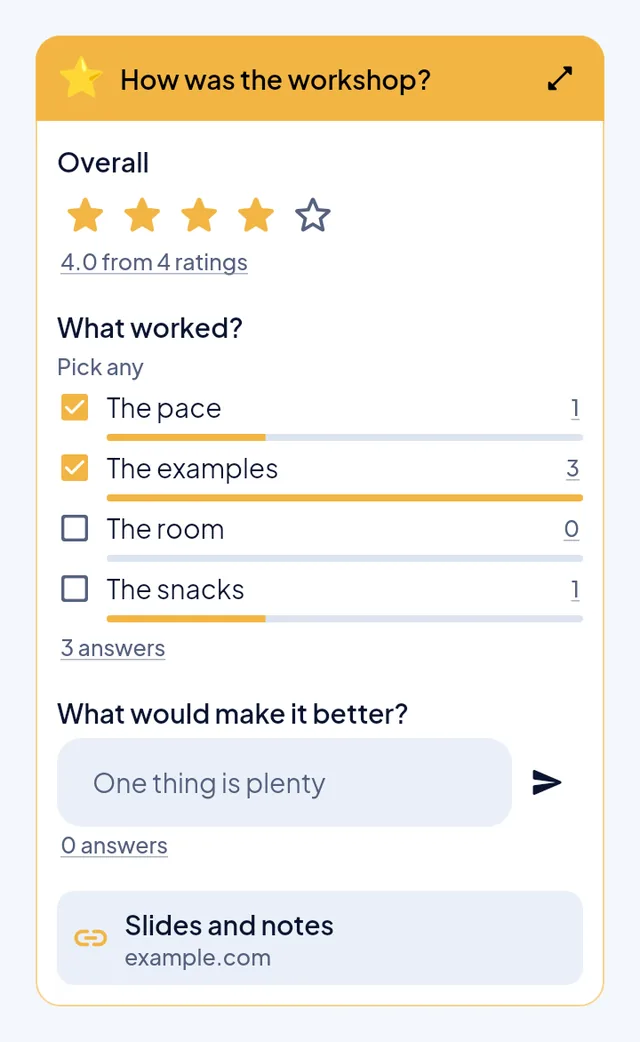
DevelopersEach example is a complete card. Paste the JSON into My cards → Import a card → Paste a card code (the app accepts a card's plain JSON there too), or send it from a community bot. The pictures are the real app, drawn with a few answers in.
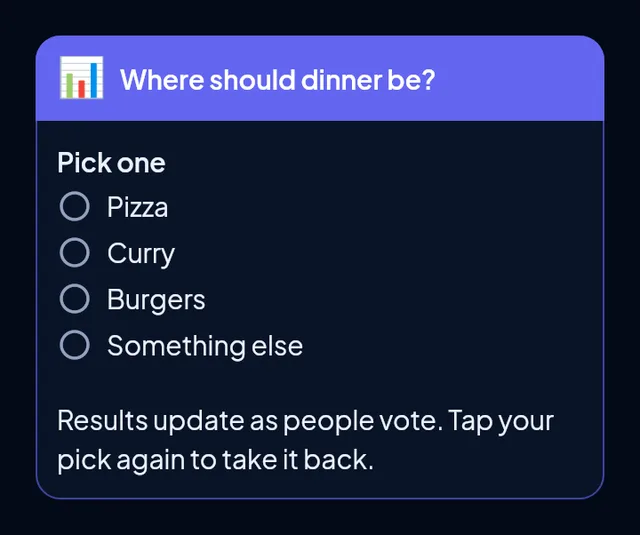
A poll
{
  "v": 1,
  "id": "dinner-poll",
  "title": "Where should dinner be?",
  "emoji": "📊",
  "accent": 4284704497,
  "blocks": [
    { "id": "pick", "k": "choice", "t": "Pick one", "o": ["Pizza", "Curry", "Burgers", "Something else"] },
    { "id": "note", "k": "text", "t": "Results update as people vote. Tap your pick again to take it back." }
  ]
}
A sign-up sheet with a checklist
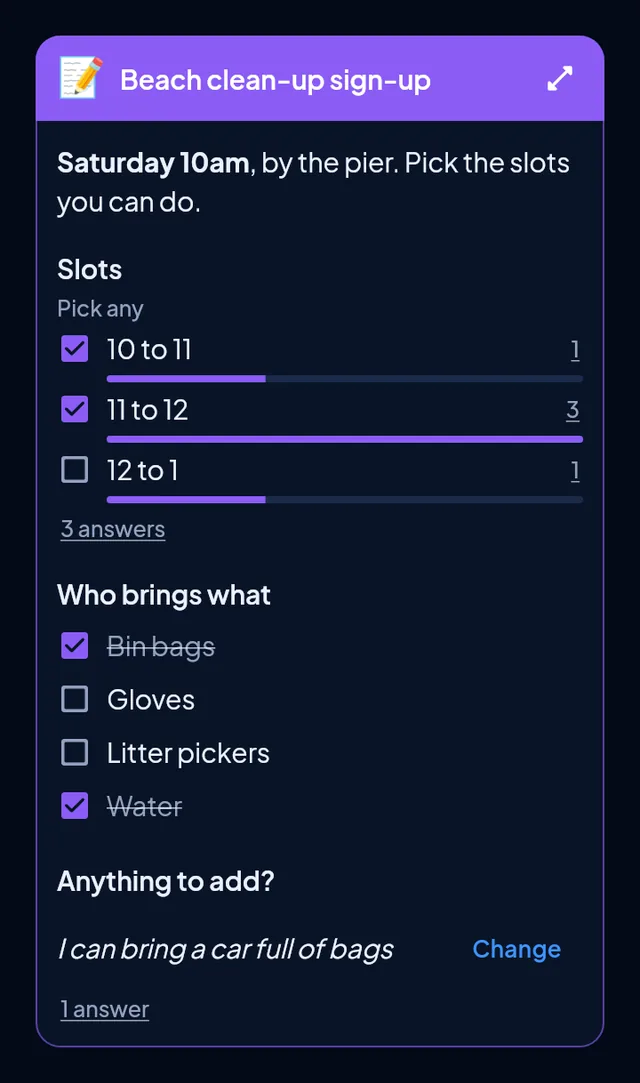
"m": true lets people pick several slots. Checklist ticks are shared.{
"v": 1,
"id": "beach-clean",
"title": "Beach clean-up sign-up",
"emoji": "📝",
"accent": 4287323382,
"blocks": [
{ "id": "intro", "k": "text", "t": "**Saturday 10am**, by the pier. Pick the slots you can do." },
{ "id": "slots", "k": "choice", "t": "Slots", "o": ["10 to 11", "11 to 12", "12 to 1"], "m": true },
{ "id": "bring", "k": "checklist", "t": "Who brings what", "o": ["Bin bags", "Gloves", "Litter pickers", "Water"] },
{ "id": "note", "k": "input", "t": "Anything to add?", "h": "Times, a phone number, questions" }
]
}A feedback form
{
  "v": 1,
  "id": "workshop-feedback",
  "title": "How was the workshop?",
  "emoji": "⭐",
  "accent": 4294096196,
  "blocks": [
    { "id": "stars", "k": "rating", "t": "Overall" },
    { "id": "best", "k": "choice", "t": "What worked?", "o": ["The pace", "The examples", "The room", "The snacks"], "m": true },
    { "id": "better", "k": "input", "t": "What would make it better?", "h": "One thing is plenty" },
    { "id": "slides", "k": "link", "t": "Slides and notes", "u": "https://example.com/workshop" }
  ]
}
Answer values
DevelopersAnswers are not part of the card. They travel separately, one per person per block, each with a time stamp; the newest wins. Bots that answer cards, and anything reading a stored chat, see these values:
| Block | Answer value |
|---|---|
button with respond | The button's label, exactly. |
choice | An array of option indexes from 0, sorted. One index unless m is true. An empty pick takes the answer back. |
input | The words, trimmed, at most 500 characters. Empty takes it back. |
rating | A whole number from 1 to 5. |
checklist | Not an answer: each item has one shared state, ticked or not, set by whoever changed it last. |
text, image, link, other buttons | Take no answers. |
null takes an answer back. Only the card's sender can close it; a closed card takes no answers until it is opened again.
Params
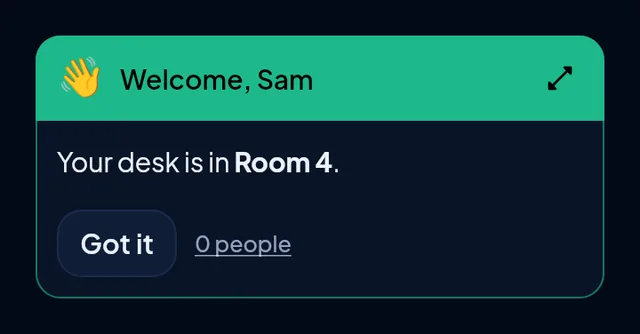
Developersp holds read-only values the card carries. Write {param:name} in the title or in any block's t, and the app shows the value. Text, numbers and true/false are filled in; a missing name or an object leaves the placeholder as it is. A script reads the same values as ctx.params. Names are 1 to 64 of A-Z a-z 0-9 _. Never put secrets in params: everyone in the chat holds them.
{
  "v": 1,
  "id": "welcome",
  "title": "Welcome, {param:name}",
  "emoji": "👋",
  "accent": 4280138122,
  "p": { "name": "Sam", "room": "Room 4" },
  "blocks": [
    { "id": "where", "k": "text", "t": "Your desk is in **{param:room}**." },
    { "id": "ok", "k": "button", "t": "Got it", "a": "respond" }
  ]
}
When you send a card in a group with Add the group's info, the app adds two params:
{
  "me": { "id": "<your account id>", "name": "Alex" },
  "group": {
    "count": 3,
    "members": [
      { "id": "<account id>", "name": "Sam", "status": "At the gym", "online": true }
    ]
  }
}
A scripted card with bot slots gets "bots": { "slotName": "<bot account id>" } when it is sent.
Pictures, assets and sites
DevelopersA card's own pictures go in image blocks as base64 (img). The app shrinks a picture to fit before it goes in. All the card's own pictures together, picture blocks and embedded assets, take at most 480 KB.
An image block can instead name a picture the phone already holds, with no bytes in the card:
{
  "v": 1,
  "id": "profile-card",
  "title": "Who's this?",
  "blocks": [
    { "id": "pic", "k": "image", "u": "avatar:sender", "t": "The sender's profile picture" },
    { "id": "guess", "k": "input", "t": "Say hello" }
  ]
}
Assets (as) are pictures a script draws by name. Each has an id (1 to 32 of A-Z a-z 0-9 _ -, not shared with a block id) and exactly one of img (base64, at most 160 KB) or url (an https:// address). A picture from a web address loads only after the person lets the card reach that site. One bad asset refuses the whole card.
"as": [
  { "id": "logo", "img": "iVBORw0KGgo…" },
  { "id": "map", "url": "https://tiles.example.com/map.png" }
],
"sites": ["api.example.com"]
Sites (sites) lists the hosts a scripted card reaches with ctx.fetch or for pictures. People see them, with a switch each, before they add the card. The hosts of web assets count too.
Community actions
DevelopersA community action lets a scripted card call a web service with keys the person must never see. The card carries the action's definition; the community that sent the card runs it, filling in its secrets from its own locked store. The script calls it with ctx.bot(name, args), and the person allows bot:name first.
n- Required. The name
ctx.botuses: a small letter, then up to 31 small letters, digits or_. Unique in the card. mGET(default) orPOST.u- Required. An
https://address, at most 1,000 characters. The host is fixed: only the path, query and body may hold placeholders. h- Headers, name to value. At most 16, each value at most 1,000 characters.
b- A body template for POST, at most 4,000 characters.
x- Hosts the community may reach for this action, at most 8. The action's own host is always added.
e- Names of secrets it reads from the community's env store, at most 8, like
STOCK_KEY. k- Key values, packaged by a community owner only. They move into the community's store on install and are stripped from the stored card. Don't put them in cards you share.
Placeholders: {arg:name} takes a value the card passes in args (escaped), and {env:NAME} takes a secret the community keeps. Install the actions on a bot from My cards with Install on a community bot, or on the server with isolink-relay bot card install <bot> <card.json>.
{
  "v": 1,
  "id": "stock-check",
  "title": "Stock check",
  "emoji": "📦",
  "accent": 4281244656,
  "blocks": [{ "id": "b1", "k": "text", "t": "Checks the shop's stock through the relay." }],
  "script": "card({ name: 'Stock check', permissions: ['bot:stock'] });\n\nfunction init() {\n  return { result: '' };\n}\n\non.check = (state, args, ctx) => {\n  const r = ctx.bot('stock', { sku: 'A-100' });\n  state.result = r.ok ? 'In stock: ' + r.json.count : 'Could not check: ' + (r.error || r.status);\n};\n\nfunction view(state) {\n  return column([text(state.result || 'Tap to check'), button('Check', 'check')]);\n}\n",
  "act": [
    {
      "n": "stock",
      "m": "POST",
      "u": "https://api.example.com/v1/stock/{arg:sku}",
      "h": { "Authorization": "Bearer {env:STOCK_KEY}" },
      "b": "{\"store\": \"main\"}",
      "e": ["STOCK_KEY"]
    }
  ]
}
A ctx.bot call only works in a one-to-one chat with the community bot that sent the card, and waits up to 20 seconds for an answer.
Scripted cards
DevelopersA card with a script is drawn by the script, not by its blocks. Its blocks are what older versions of the app show, after a line of text the app keeps in a block with the id _fb: the card's fallback, at most 500 characters, or Update Isolink to use this card. The script can still draw the card's picture blocks by id.
A script may start with card({...}), the card's manifest: its name, and what it may use (sounds, the keyboard, sites, community bots, people's pictures, files), its players, rounds, bot slots and screens. Each person allows what it asks for before it runs. A scripted card can also ask for a file with an upload button; before the file goes into the chat, the app runs the card's action with a stand-in file, and if the card would turn it down, the person sees why and nothing is sent.
Everything about scripts, from the manifest to canvases, timers and screens, is in the Scripted cards reference.
Cards from community bots
DevelopersA community bot can send cards: with a fixed reply (isolink-relay bot rule add … --card file.json), or from a language model with its card tools. The community accepts the long form below as well as the app's short form, checks the card as the app does, and fills in missing block ids. In the long form, accent may be a colour like "#6366F1", and an image block may name an https picture by url, which the community fetches and puts in the card.
{"title": "Wi-Fi", "emoji": "📶", "blocks": [
  {"type": "text", "text": "The password is **on the fridge**."},
  {"type": "choice", "id": "worked", "text": "Did it work?", "options": ["Yes", "No"]}
]}
When someone answers a bot's card, the bot hears it. A card a bot sends as a preview never reports answers. See Bots for rules that answer cards.
Codes, files and checks
Developers- Card code:
isolink-card:followed by the card's JSON, gzipped, in base64url. Spaces and line breaks in a pasted code are ignored. The part after the prefix may be at most 1 MB, and the JSON it unpacks to at most 2 MB. .isocardfile: the card code as UTF-8 text. MIME typeapplication/x-isolink-card. A file may also hold plain gzip, or a card's plain JSON. At most 2 MB.- Pasting: the app takes the first card code anywhere in the text, or the whole text as a card's JSON when it starts with
{. - Sending: the app refuses to send a card whose script doesn't parse.
Limits
Developers| What | Limit |
|---|---|
| Blocks | 30 (plus the _fb block on a scripted card) |
| Card id, block id | 1 to 40 of A-Z a-z 0-9 _ - |
| Title | 80 characters |
| Emoji | 8 code points |
text block | 2,000 characters |
Other t, options, items, hints | 120 characters |
| Choice options | 2 to 12, all different |
| Checklist items | 1 to 30 |
| Web address | 1,000 characters, http or https |
| Typed answer | 500 characters |
| Picture blocks | 3 |
| One picture | 160 KB, JPEG, PNG, GIF or WebP |
| All the card's own pictures | 480 KB |
| Card JSON without pictures | 64 KB |
| Params | 8 KB as JSON |
| Assets, sites, community actions | 16, 16, 8 |
| Script | 49,152 characters |
| Fallback text | 500 characters |
| My cards | 200 cards |
| Community card library | 768 KB a card; 50 cards an account and 2,000 in all by default (cards_per_account, cards_total) |